Most growing businesses face the same problem.
Their software works well in the beginning. Then the business grows. More customers visit the website. Teams need to make more changes. Customers expect faster service.
That is when the trouble starts.
A small update can take weeks. A new feature can take months. The website may slow down during a sale. One small issue can affect many parts of the system.
Customers get frustrated. Sales may fall. Teams spend too much time fixing problems.
Cloud native development can help.
It is a better way to build software. This leads to a significantly faster delivery time for companies. That means apps scale to a large number of users, and systems are declarative (systems can self-heal when something goes wrong).
This is not just an IT concept.
It can impact sales, customer trust, cost, and ultimately growth. This guide will elaborate on a single concept for you.
1.What Cloud Native Development Is
Many older systems are built as one big application. Moreover, everything is connected to each other, such as:
- Customer accounts
- Payments
- Product search
- Order tracking
- Delivery updates
- Messages
This can make even small changes more complicated.
A team may want to improve the payment process. But first, it may need to test many other parts of the system.
A small change can become a big project.
Cloud native development works in another way.
It breaks one large system into smaller parts.
Each part has one job.
For an online store, different parts may handle:
- Customer login
- Product search
- Payments
- Order tracking
- Delivery updates
- Customer notifications
These parts can work on their own.
An example would be a company adding an objective: to increase payments.
This can coexist alongside product-centric pages, customer accounts, or even delivery tracking. In other words, this makes it easier to update things and safer.
The goal is very simple.
Develop software that grows with your business.
The software can run on cloud services. It can run on a private server or even both.
2.What Cloud Native Applications Do
These applications are built to run on cloud systems. They can also scale their service as per requirements during peak hours of the business and during slower hours.

Check out the following example of a travel website in December. There are so many bookings when searching for flight tickets and comparing hotels.
The search and booking parts become busy.
A cloud native system can add more capacity to those parts. The remainder of the site continues to function as normal.
This plays a part in the business to serve more customers. In addition, it avoids the websit to lag or even not working at all.
Cloud native applications can:
- Handle more users during busy times
- Release updates faster
- Keep working if one part has a problem
- Use extra resources only when needed
- Support websites, mobile apps, internal tools, and partner tools
3.Why Businesses Need It
Customers expect online services to work well. They want:
- Fast websites
- Payments to work
- Correct order updates
They do not care what technology a business uses. They care about the result.
If they face any of these challenges:
- A slow website can make a customer leave.
- A failed payment can mean a lost sale.
- A missing order update can lead to complaints.
Business leaders want fewer system problems.
They want better cost control and the business to grow without constant software issues.
Cloud native development can help with these needs.
3.1.Launching Features Faster
In many companies, a small and legacy sytem software may take a long period of time.
However, at that time, the team may need to test the entire system. It may need approval from many people. It may worry that one update will break another part of the app.
This can delay useful improvements.
Cloud native development lets teams make smaller changes.
The team changes only the approval part. It can test the change with a small group.
If it works, it can release the change to everyone. This reduces risk. It also saves time.
The benefits include:
- New features reach customers sooner
- Customer feedback is used faster
- Teams can test new ideas with less risk
- Changes do not need to wait for big releases
- Large release failures happen less often
Tools alone do not make a business faster. Teams still need clear plans.
They still need
- Testing
- Communication
3.2.Handling Growth
Customer demand can change quickly. Retail websites get busy during sales. Travel websites get busy during holidays. Finance apps get busy when markets move.
Older systems often need businesses to buy enough servers for the busiest day.
This can waste money. The extra servers may not be needed for most of the year.
But the business still pays for them.
Cloud native applications can grow when demand grows. They can reduce when demand falls.
This can help businesses:
- Avoid crashes during busy periods
- Keep websites fast
- Spend less on unused resources
- Run sales with more confidence
- Enter new markets more easily
3.3.Reducing Downtime Impact
Downtime refers to a website, application, or system not being up and functioning. Unexpected interruptions can cost money. The shop cannot sell to customers or has to pay.
Cloud native applications can reduce the impact. For example, a delivery update service may stop working. Customers may not get delivery messages for some time.
Cloud native systems often use:
- Separate services, so one problem does not affect everything
- Automatic restarts when a service stops
- Traffic shared across different resources
- Early alerts when problems appear
- Small updates instead of large changes
- Backup and recovery plans
This protects important customer services.
It is very useful during busy periods.
4.Tech Stack of Cloud Native Development
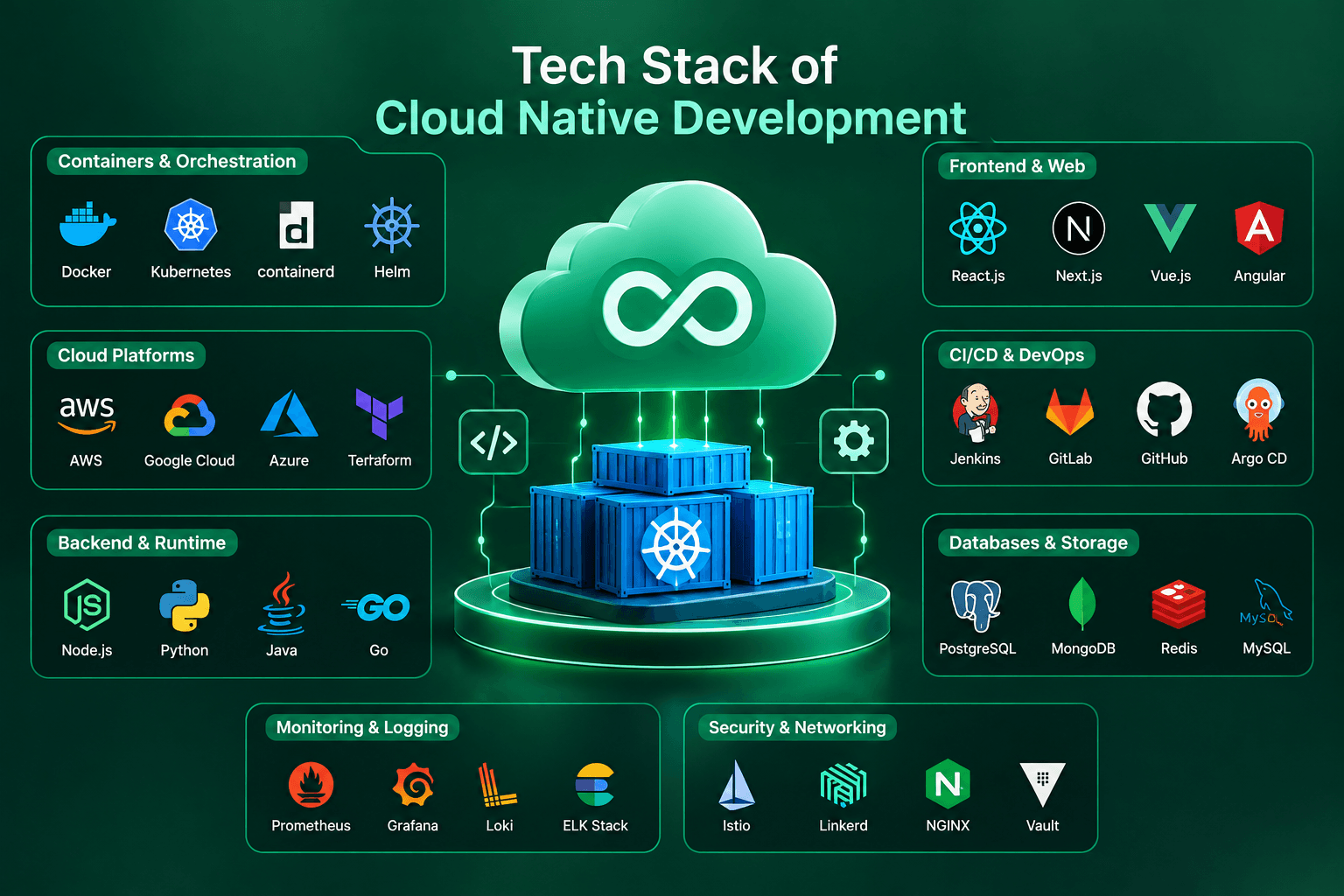
The following tech stack will help you to know what’s the technology is used for behind developing cloud native applications.
4.1.Containers
A container is like a small box for an app. It holds the app and what the app needs to work. This helps the app run the same way in different places.
It should work in testing and when customers use it. This reduces a common problem.
4.2.Microservices
Microservices means breaking one big app into smaller parts. Each part does one job.
For example, an insurance company may have separate parts for:
- Customer registration
- Pricing
- Claims
- Payments
- Documents
- Fraud checks
The company can update the claims part. It does not need to change the payment part.
This makes updates easier.
4.3.Kubernetes
Kubernetes helps manage containers.
Think of it as an automatic manager. It can do various things:
- Start services
- Stop services
- Restart them when they fail
- Add more power when traffic goes up
- Reduce power when traffic goes down.
For example, product search may become busy during a sale.
Kubernetes can add more resources for the extra visitors. After the sale, it can reduce those resources.
Kubernetes can be useful.
4.4.APIs
APIs are used to integrate different systems that will be connected to:
- Payment companies
- Delivery partners
- Customer support tools
- Accounting software
- Stock systems
- Data tools
APIs help these systems share information automatically. This reduces manual work.
4.5.Monitoring
Monitoring means checking what is happening in the system. It helps teams spot problems early.
It can answer questions like:
- Why is the website slow?
- Why are payments failing?
- What changed before customers complained?
- Which part is using a lot of power?
5.Where the Business Value Comes From
Cloud native development is not only about technology.
The real value is better business results.
It can:
- Help a business work faster
- Minimize waste
- Boost customer service.
5.1.Less Money Lost to Downtime
Imagine an online marketplace. The customer review section stops working. In a poor system, this may affect the whole website.
Customers may not be able to browse products and make payments.
In a cloud native system, the review section may stop working.
The business can fix the review problem without closing the full website.
5.2.Better Control of Cloud Spending
Cloud services can save money and also create high bills.
This happens when a business uses more resources than it needs.
Cloud native systems can help reduce waste. They use more resources when demand is high and less when demand is low.
For example, a business may add extra capacity during a sale.
It can remove that capacity after the sale.
Businesses can also save money by:
- Turning off unused test systems
- Removing old resources
- Tracking costs by team or app
- Checking the cost of each order or payment
Instead of asking, “How much are we spending on cloud services?” ask:
“How much does it cost to process one order?”
This gives a clearer view of spending.
5.3.Teams That Get More Useful Work Done
Developers often spend time on repeated tasks.
They may
- Set up test systems
- Release updates by hand
- Fix small technical issues
Automation can do many of these tasks.
- Create test systems
- Test code
- Check for security issues
- Release updates
- Watch system performance.
This gives teams more time for useful work.
For example:
- Improving the customer experience
- Building new features
- Fixing product problems
- Supporting new markets
- Improving internal work
5.4.A Better Experience for Customers
Customers expect websites and apps to work well. A slow site can make customers leave. A failed payment can stop a sale. A missing order update can worry customers.
Cloud native development can improve the customer experience.
- Make websites faster
- Reduce downtime
- Help teams release improvements faster
- Handle busy times better
- Keep information correct across websites, apps, and partner systems.
For example, a delivery company can keep tracking details updated during busy periods.
This can reduce customer calls.
It can also build trust.
6.How Companies Usually Start
Cloud native development is not only about moving software to the cloud.
It also changes how software is built, tested, secured, and managed. The best place to start is one clear business problem.
6.1.Begin With High-Value Applications
Do not try to change every system at the same time. This can cost too much.
It can also create risk. Start with one important system.
Good examples include:
- A customer portal with performance problems
- An online store that gets slow during sales
- An old system that delays new product launches
- An app that needs regular updates
- A manual process that takes too much time
- A system that is costly to maintain
- A digital platform that helps bring in sales
Start small. Show results.
Then make bigger changes step by step.
6.2.Build Security in From the Start
Security should be part of the plan from the start. Do not add it at the end.
- Use strong login checks
- Give people and systems only the access they need
- Protect customer data
- Check for security issues often
- Watch for unusual activity
- Have a clear plan for security problems.
A simple rule is this:
No person, device, or system should get access automatically.
Everyone must have the right permission.
7.How to Know If It Is Working
Success is not about saying, “We moved to the cloud.” It is not about saying, “We use Kubernetes.” The real question is simple.
- Is the business getting better results?
- Are updates faster?
- Is the website more reliable?
- Are customers happier?
- Are costs under control?
Useful things to track include the following.
7.1.Business Side
- Sales and conversion rates
- Customer satisfaction
- Customer retention
- Revenue per customer or transaction
- Time needed to launch a new feature
- Customer complaints caused by system problems
- Website performance during busy times
7.2.Delivery and Reliability
- How often teams release successful updates
- How long it takes to release a change
- How often a release causes a problem
- How quickly teams fix a problem
- Website or app availability
- Payment and transaction failure rates
7.3.Cost Side
- Cloud cost per order, customer, or transaction
- Cost of downtime
- Cloud spending by team or app
- Unused cloud resources
- Savings from automatic scaling
- Time saved through automation
A good result may sound like this:
“We reduced the cost per order. We handled more customers. We released updates faster. We kept the website working during busy times.”
8.Conclusion
Cloud native helps businesses develop software that is able to grow alongside them. It allows apps to be updated more easily, systems to scale to more customers, and lowers the risk of large failures within a platform. Not value from one tool.
It originates from software that enables speed within a business. Doing this helps businesses address customers faster, minimizing expenses and preventing costly problems.
Cloud native development may be handy for businesses that rely on websites, apps, online payments, customer portals, or digital services. This enables teams to react more quickly and gives leaders better visibility into costs and performance. Moreover, it also helps the business grow without software becoming a major problem.
9.Common Questions Along With Their Answers
Qus: What is cloud native development?
Ans: It is a way to build software that is easier to update, easier to manage, grow, secure, and fix when something goes wrong.
Qus: When should a business invest in it?
Ans: It may help when
- A business needs faster updates
- There are too many system problems
- More customers are using the website or app.
- IT work is too manual.
- Cloud costs are hard to control.
Qus: What are the main risks?
Ans: The main risks are increased cloud costs.
- Legacy systems may become too complex.
- Security can be weak.
- There may not be enough skilled people.
- Responsibilities may be unclear.
- Businesses can reduce these risks.
To overcome these risks, start small, keep systems simple, train the team, set clear rules, and measure results.
Qus: How long does it take?
Ans: It depends on the business, how many systems need to change, how complex they are, and what the business wants to improve first.
Many companies start with one important app. Some start with one customer journey. Then they make changes step by step.
Qus: How can a business measure the return?
Ans: Look at the results.
- Are features released faster?
- Are there fewer outages?
- Is the cost per transaction lower?
- Are customers happier?
- Are sales improving?
- Are teams saving time?
- Is the website working well during busy periods?